
Tsim Ib Tus As Khauj
Txhawm rau teeb tsa tus as-qhauj thiab them nyiaj hauv Madison Water Utility online them nqi, koj yuav tsum:
- Sau npe koj tus as khauj
- Ntxiv koj tus as khauj Them Nyiaj Rau Lub Nroog Cov Kev Pab Cuam rau koj qhov chaw nyob
- Npaj them nyiaj, teem sij hawm them nyiaj rau lub sij hawm tom ntej, los sis sau npe rau hauv kev them nyiaj as tas naus mav.
Yog hais tias koj muaj kev nyuaj siab, tej zaum koj yuav tau tshem qhov is taws nem npaus xawj cache. Kawm paub seb yuav tshem txhua qhov is taws nem npaus xawj cache tawm li cas:
-
Tsim Ib Tus As Khauj
- Mus rau www.municipalonlinepayments.com/cityofmadisonwi/utilities
- Nyem rau ntawm “Kos Npe Nkag / Sau npe" nyob rau hauv lub ces kaum sab xis sab saum toj.
- Txhawm rau tsim tus as khauj tshiab, nyem rau ntawm “Tsim ib tus as khauj" hauv qab ntawm nplooj ntawv.
-
Paub meej tias koj tus Khauj
Mus rau koj tus qhov email inbox. Koj yuav tau txais email los txheeb xyuas los ntawm “Qhov Yam Ntxwv Kev Nkag Cuag Tau Rau Zej Zog (noreply@identity.tylerportico.com) ", nrog rau kab lus “Zoo siab txais tos rau koj tus as khauj Nkag Cuag Tau Rau Zej Zog".
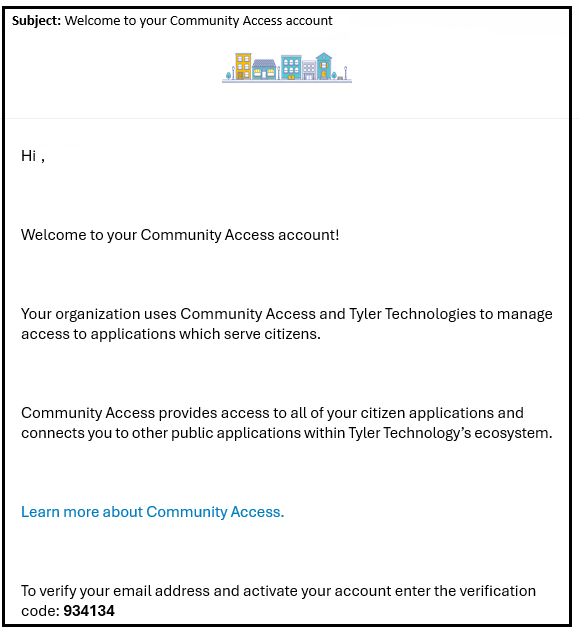
- Luam cov lej muab los txheeb xyuas koj tus email chaw nyob thiab qhib koj tus khauj.
- Thaum koj qhib koj tus khauj, koj tsis tas yuav xaiv ib qho ntawm cov kev xaiv kev ruaj ntseg. Xaiv lub "mus txuas ntxiv" khawm kom nkag mus.
- Yog tias koj thov kom pab sau koj tus phav xab vawj, ces thov sau tus phav xab vawjtxhawm rau los txheeb xyuas thiab qhib siv koj tus as khauj.
- Nyem rau ntawm "Cov Kev Pab Hauv Nroog". Qhov no yuav rov qab koj mus rau nplooj ntawv them nqi hauv Municipal Services Services.
-
Ntxiv Koj Tus As Khauj Them Nqi Pab Cuam Hauv Nroog
Thaum koj tau tsim koj tus as khauj, koj yuav tau txuas nws rau koj cov nqi.
- Thaum koj nkag rau hauv lab npauv lawm thiab rov qab mus rau nplooj ntawv them nqi hauv Lub Nroog Cov Kev Pab Cuam, nyem “Ntxiv tus as khauj".
Sau koj Tus Naj Npawb As Khauj thiab Tus Naj Npawb Neeg Qhua. Koj yuav nrhiav tau cov naj npawb xov tooj no nyob rau hauv koj daim nqi nyob rau hauv lub ces kaum sab xis saum toj kawg nkaus.

- Koj Tus Naj Npawb As Khauj pib nrog “000" (kab thib ob ntawm koj daim nqi).
- Koj tus lej neeg siv khoom pib nrog "1" (thawj kab ntawm koj daim nqi).
- Yog tias koj tsis paub koj tus naj npawb as khauj thiab neeg qhua, ces thov hu rau peb ntawm 608-266-4641 los sis municipalbilling@cityofmadison.com.
Kev Ntxiv Ntau Tus As Khauj
Yog tias koj muaj cov nqi them rau ntau qhov chaw nyob, ces koj yuav tau ntxiv txhua tus as khauj mus. Txhawm rau ntxiv ntau tus as khauj:
- Mus rau Ntxiv los sis tshem tawm cov as khauj hauv ib sab ntawm sab laug.
- Nyem Ntxiv Tus As Khauj ntawm nplooj ntawv Ntxiv los sis tshem tawm cov as khauj.
- Sau Tus Naj Npawb As Khauj thiab Neeg Qhua rau txhua tus as khauj ntxiv.
-
Sau Npe Them Nyiaj As Tas Naus Mav
- Mus rau cityofmadison.com/epayment/water thiab nkag rau hauv lab npauv.
- Nyob rau sab xis ntawm nplooj ntawv, nyem “Sau npe them nyiaj as tas naus mav".
- Nyem “Sau npe" ib sab ntawm tus as khauj them nqi uas koj xav teeb tsa nrog kev them nyiaj as tas naus mav.
- Xaiv Hnub Them Nyiaj. Xaiv lub sij hawm uas koj xav kom txiav nyiaj tawm ntawm koj tus as khauj as tas naus mav (daim qauv).
- Xaiv ib Txoj Kev Them Nyiaj. Koj tuaj yeem them los ntawm daim npav khes div los sis teeb tsa daim tshev nyiaj los sis tus as khauj rho nyiaj savings (eCheck).
- Kev them nyiaj nrog daim npav khes div thiab ded npiv yuav muaj tus nqi them $2.95.
- Tsis muaj tus nqi rau kev them nyiaj eCheck uas siv them nyiaj as tas naus mav. Qhov kev xaiv eCheck yog nyob hauv qab ntawm ntu. Yog tias koj xav them los ntawm eCheck xaiv, "Enter eCheck tshiab."
-

6. Nyem “Sau Npe Tam Sim No". Tam sim no koj tau sau npe rau hauv qhov kev them nyiaj as tas naus mav.