
Create an Account
To set up an account and make a payment in the Madison Water Utility online billing system, you will need to:
- Create an account
- Add your Municipal Services Bill account
- Make a payment, schedule a future payment, or enroll in auto pay.
If you experience technical difficulties, you may want to clear your browser cache. Learn how to clear the cache for each browser:
-
Create Your Account
- Go to www.municipalonlinepayments.com/cityofmadisonwi/utilities
- Click on “Sign in / Register" in the top right corner.
- To create a new account, click on "Create an Account" at the bottom of the page.
-
Verify Your Account
Go to your email inbox. You will receive a verification email from “Community Access Identity (noreply@identity.tylerportico.com)," with the subject line, “Welcome to your Community Access account."
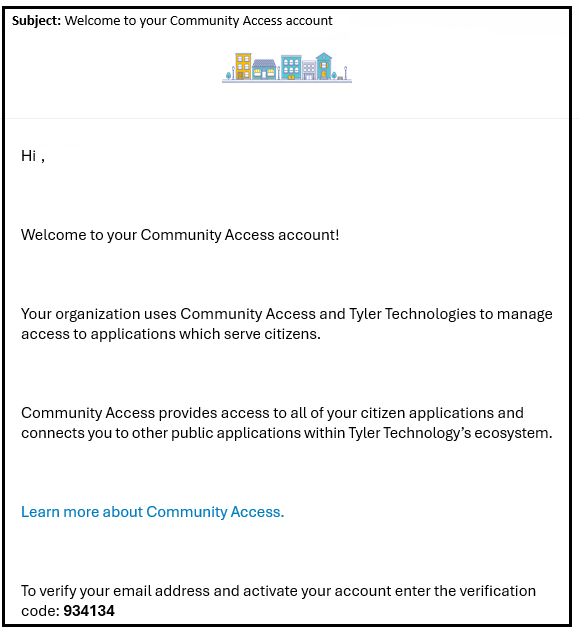
- Copy the code provided to verify your email address and activate your account.
- Once you activate your account, you do not have to choose any of the optional security options. Select the "continue" button to log in.
- If you are prompted, enter your password.
- Click on “Municipal Services." This will return you to the Municipal Services billing page.
-
Add Your Municipal Services Bill Account
Once you have created your account, you will need to connect it to your Municipal Services bill.
- Return to the Municipal Services billing page and click “Add account."
Enter your Account Number and Customer Number. These are located on the top right corner of your bill.

- Your Account Number starts with "000" (second line on your bill)
- Your Customer Number begins with a "1" (first line on your bill)
- If you do not know your account or customer numbers, please contact us at 608-266-4641 or municipalbilling@cityofmadison.com.
Add Multiple Accounts
If you have bills for multiple properties, you will need to add each account. To add multiple accounts:
- Go to "Add or Remove" accounts in the left sidebar.
- Click "Add Account" on the "Add or Remove" accounts page.
- Enter the Account and Customer Numbers for each additional account.
-
Enroll in Auto-Pay
- Go to cityofmadison.com/epayment/water and log in.
- On the right side of the page, click “Enroll in auto pay." This is the second option under, "Pay bills."
- Click “Enroll" next to the bill account you would like to set up with auto pay.
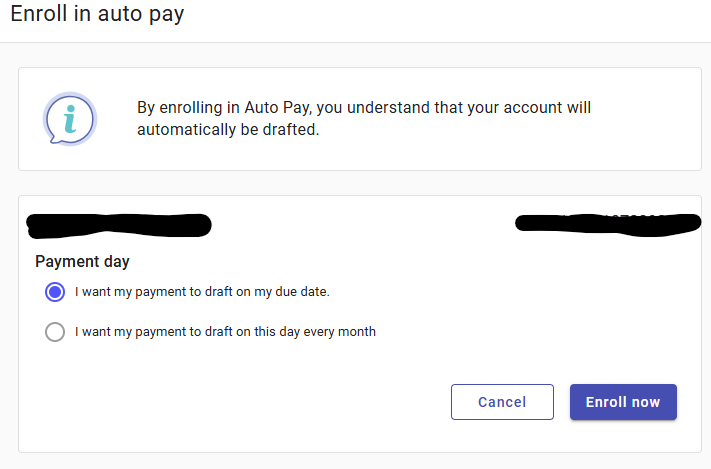
Select a Payment Day. Choose when you would like your auto pay to be charged (drafted). Click “Enroll now" to go to the next step.
Select a Payment Method. You can pay by credit card or set up checking or savings account withdrawals (eCheck).
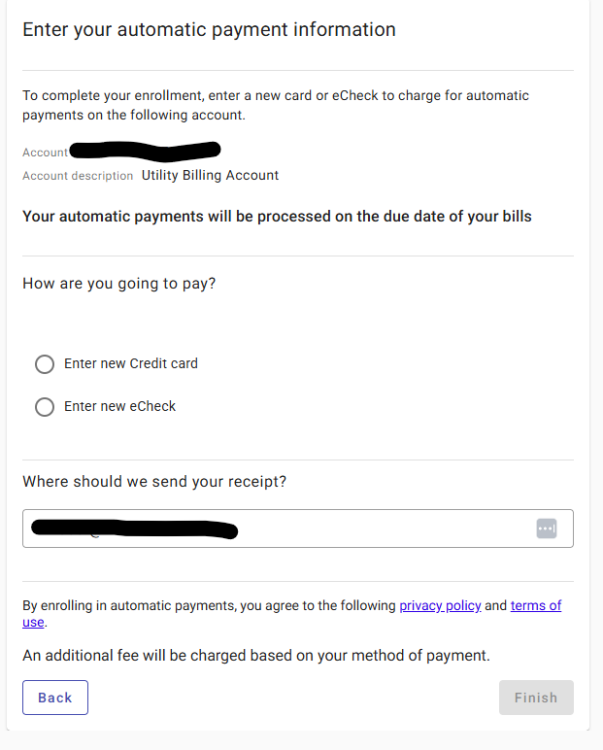
- Credit and Debit Card payments have a $2.95 service fee.
There is no fee for eCheck payments using auto pay. The eCheck option is at the bottom of the section. If you want to pay by eCheck select, "Enter new eCheck."

6. Click “Finish". If it asks you to accept cookies before hitting “Finish", please accept the cookies and then proceed to click Finish. You are now enrolled in autopay.