
Amending an Agenda
When it is necessary to amend an agenda
An agenda that has been published must be amended to make any change to the published agenda.
NOTE: Amended agendas must be posted at least 24 hours in advance of the meeting.
An amended agenda is required for all of the following situations:
- change to the meeting location
- change to the meeting time
- add a file to the agenda
Overview of required steps
Amending an agenda requires the following steps:
- Change agenda to amended in Legistar and modify the agenda, following the instructions provided below.
- Publish the amended agenda following the instructions in Publishing an Agenda.
Send amended agenda to Clerk's Office (E-mail clmeetings@cityofmadison.com) for the clerk to post.
NOTE: Amended agendas must be posted at least 24 hours in advance of the meeting.
- If the amended agenda includes one or more new files, upload new cross reference list [refer to Agendas and scroll down to Agenda Spreadsheet (Cross-Reference List) for instructions]
Instructions to amend an agenda in Legistar
When amending an agenda to add file(s), add new files to the end of the agenda; you can additionally create an addendum to the agenda which provides more visibility for the added files.
NOTE: When amending an agenda, do not change the numbering of items that were on the initial agenda as this will create problems with the cross reference list if anyone has already registered to speak on any items (See Agendas in Knowledge Base for more information).
Follow the instructions below to amend an agenda.
- Locate the agenda in Legistar via the Agendas module.
Click Edit and select Edit Record.
NOTE: If the agenda is locked, you will need to select Unlock first.
- In the Calendar tab change the Current Status to Amended.
- Select Agenda tab.
Make edits as needed, making sure to add any new files to the end of the agenda before Adjournment.
NOTE: To bring additional visibility to new items being added, follow the instructions under Add "Addendum" or other header below before continuing.
- Publish the amended agenda following the instructions in Publishing an Agenda.
If one or more items have been added, then update the cross-reference list using the instructions in Agendas in Knowledge Base. Additionally circulate the amended agenda via email to staff and board members as you would when initially publishing an agenda.
Add "Addendum" or other header
Add "Addendum" or other header when amending an agenda for maximum visibility when adding new files to a published agenda.
- Select the last item before Adjournment. Right click and select Add Before Selected Line.
- Select Header/Comment and select style 3. Add a description of Addendum. Other commonly used descriptions include Late Items for Consideration and Late Items.
- If necessary, add another header line for the section the item belongs to (Discussion, Items to be considered, New Business, etc.): Insert a line after the Addendum, select style 2, and add the appropriate header description.
- Right click and select Add After Selected Line and add the file into the File Number field.
- Select Auto-# to add numbers to the new items.
- Post the amended agenda to Insite.
Examples for reference
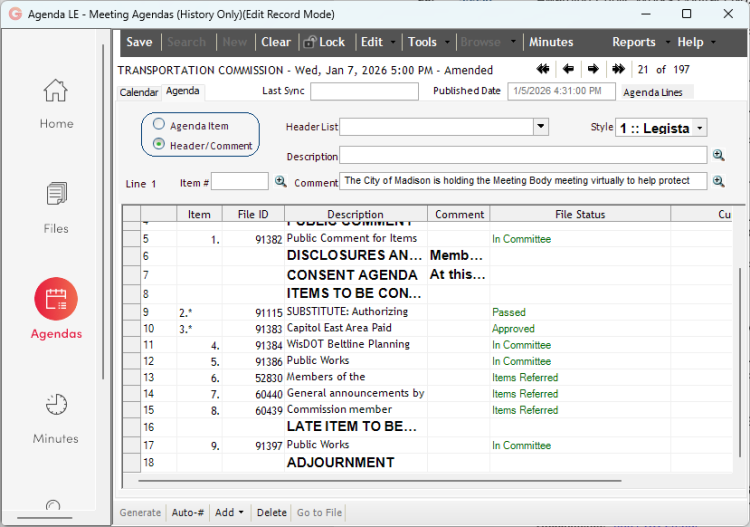
There are three examples below for reference. Click on the title to see the full agenda in PDF format, and scroll down to view how the agenda appears in Legistar, as well as a snip of the agenda in PDF format (showing the added file and header).
Transportation Commission 1/7/26 Agenda
This is how the edited part of the agenda looks in Legistar:
This is how the edited part of the agenda looks in PDF format from the web portal:

Common Council Executive Committee 3/10/26 Agenda
This is how the edited part of the agenda looks in Legistar:

This is how the edited part of the agenda looks in PDF format from the web portal:

Board of Public Works 6/10/26 Agenda
This is how the edited part of the agenda looks in Legistar:

This is how the edited part of the agenda looks in PDF format from the web portal:
