
Course Development Process
Every course supported by the HR-OD unit moves through six basic steps:
- Plan: Define the audience, need, objectives, format, learning experience, and organizational goals or needs the training would help meet.
- Schedule + Submit: Get the course on the calendar, establish the key dates, and submit operational pieces needed to launch it.
- Build: Continue to develop the course materials and double check everything looks good for our learners.
- Market: Help the right employees find and register for the course. Stir excitement!
- Deliver: Facilitate the learning experience and support learners during the course.
- Enhance: Use feedback and experience to improve the course for next time.
Use the 2027 Course Planning Form and the information below to guide you as you pull together all your course information.
Questions? Reach out to OrganizationalDevelopment@cityofmadison.com.
Course Development Steps

-
Plan

Before you start building or updating your course, take a moment to reflect and plan. Think of this as a cycle, not a one-time project or training. Each time you deliver a course, you learn something that can make the next offering better!
Before You Begin
Before jumping into slides or course materials, pause and ask:
- What workplace need are we trying to address?
- Who needs this learning?
- What should participants be able to do after the course that they couldn't do before?
- What will give them an opportunity to practice or apply the learning?
- How will we know the course was useful?
If you can answer these questions, you're ready to start planning. If you can't, that's okay. Start with the need – not the slides!!
If This is a Returning Course, Consider…
- Review what worked well in previous offering(s).
- Consider learner feedback and what you would change.
- Identify any updates to the content, activities, audience, or learning objectives.
- Meet with HR-OD to briefly review how the previous offering went and what to know for 2027.
Quick Tip
- Don't start by asking: “What information do I need to teach?"
- Start by asking: “What do I want learners to be able to do?"
That shift from content to learning will guide many of the decisions you'll make throughout the course development process.
Book time to meet with HR-OD to look back at how past years' data might impact future changes, offerings, or logistics.
-
Schedule & Submit

In 2027, course dates and Course Planning Form (CPF) go together. We will not hold a date based on a date request alone.
Schedule
- In Step 1: Plan, you should consider how many sessions each year and how often you want to offer your course.
- Check the 2027 HR-OD Calendar Availability spreadsheet when filling in your form to make sure the time is still open.
- Share your desired date(s), start & end time(s), duration, and total number of sessions in this step via the CPF.
Submit
- Gather all required course information via the CPF and submit by sending to HR-OD.
- The deadline for the 2027 Course Planning cycle is Friday, December 4th to have your CPF into HR-OD.
How to know if you can move onto step 3:You'll receive a calendar hold from OrganizationalDevelopment@cityofmadison.com with an updated status in the body of the invite.
-
Build

In Step 3: Build, you and HR-OD have a few overlapping responsibilities that occur concurrently.
Your (Learning Partner) Build Responsibilities
- Respond to proofing email within 3-business days – this is where you get a chance to review your course webpage, Eventbrite registration page, and send feedback or change requests.
- Design your course and accessible supporting content. (Slide Decks, Learner Workbooks, Pre-Work if any, and any other resource(s) you want to share with your learners).
- Use Learning + Development Templates to pull your course together.
- Reach out to HR-OD if support is needed when creating your content.
- Send course curriculum & materials to HR-OD inbox at least 4 weeks prior to your course date so there's ample time to review, adjust, and post.
- Absolute Deadline: Final versions of materials need to be posted at least 1 week prior to your course date.
Our (HR-OD) Build Responsibilities
- With the information you shared in your CPF, HR-OD will build your course webpage, Eventbrite registration page, make sure its reflected in the calendar.
- L+D Specialist works with you to curate content to meet organizational goals, understand learners' needs, and support you in preparing your best content.
- Once we get copies of your materials, we post them on your course webpage.
- Posting these items on the course page is a standard practice when working with HR-OD. This allows for folks with access needs to have adequate time to review materials, arrange accommodations, and engage equitably from the day they register!
-
Market
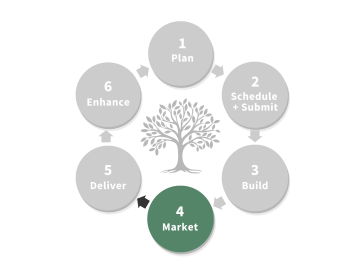
In Step 4: Market, there are also a few areas where you and HR-OD have overlapping responsibilities.
- Every HR-OD supported course is marketed by us in the form of:
- Weekly email blasts to All Email Users beginning 6 weeks out from your course date.
- Course calendars printed and distributed to every department on a quarterly basis.
- Digital TV advertisements in facilities with digital displays.
- Word of mouth by HR-OD staff in consultations and applicable meeting settings.
- It is YOUR responsibility as facilitator to share the marketing load. As subject matter expert, you're more likely than us in HR-OD to be in spaces or in-connection to folks who could benefit from a dedicated training on your topic. Make your time worth it by spreading the word and get as many folks to join your class as possible!
- Request course highlight emails, course banners for webpages, etc.
- Forward highlight emails
- Forward weekly email blasts
- Develop and distribute flyers
- Share via word of mouth – leverage your networks
- Included on the Learning Partners Hub: Market Your Course are ideas for how to market your course in addition to those weekly emails.
- You can also check registration numbers by logging into Eventbrite and checking registrants whenever. If you see numbers are low, think “what marketing should I do to help!". Email HR-OD anytime for support or ideas.
- Every HR-OD supported course is marketed by us in the form of:
-
Deliver

In the Weeks Leading up to Your Course
- 3-weeks prior to your course date you'll receive a reminder email from HR-OD checking in on course materials, marketing needs, if there have been any access needs requests, and preparations for your course.
- 1-week prior to your course date you'll receive an update on the above.
- 1-day prior or the day of your course date you'll receive one last check-in with reminders on attendance and gathering feedback from attendees.
On the Day of Your Course – Virtual
- Log into the Zoom meeting link 10-15 minutes early
- Check your tech, enable captions, prepare your screens and teaching materials.
- Admit and welcome participants.
- Engage folks in a check-in question if that's your style.
- Log Attendance in Eventbrite as folks join - refer to the Eventbrite How-Tos webpage.
- If you find it difficult to take attendance and welcome folks at the same time, consider asking a colleague to hop into the Zoom link for the first 15 minutes of your course and support taking attendance.
- While presenting your content – remember YOU are the subject matter expert 😊
- Save the last 3-5 minutes of your course to gather feedback on your course.
- Personally ask attendees for their feedback using the Course Evaluation Link. Add a QR code to your slides for easiest access. Share the hyperlink in the chat.
On the Day of Your Course – In-Person
- Arrive at least 30 minutes early to your reserved room
- Set up the room, make sure you have your learning materials, sign in sheets, etc. ready to use, prep your technology – slide deck(s), audio – if applicable, adjust if necessary.
- Place printed attendance sheet in easy to access & view spot
- Verbally request folks sign in for attendance purposes, use this to check folks in on Eventbrite Check-In page after the course is complete.
- OR have Eventbrite up and check folks in via computer on-site.
- While presenting your content – remember YOU are the subject matter expert 😊
- Save the last 3-5 minutes of your course to gather feedback on your course.
- Personally ask attendees for their feedback using the Course Evaluation Link. Add a QR code to your slides for easiest access.
-
Enhance

Continuous improvement is the foundation here.
- Use the Course Evaluation Survey to collect learner feedback.
- Review what worked (and what didn't) and incorporate those insights into future iterations of the course.
HR-OD sends evaluation summaries to you and your supervisor within 2 weeks after your course date and offers consults & opportunities for update and refinement annually.
This isn't solely for the benefit of the course. It can be for you and your professional goals and growth as well!